
Elden Ring: Perfect for Handheld PCs
Author : Matthew
Jan 12,2026
Elden Ring performed exceptionally well on the Asus ROG Ally X. With the launch of Nightreign, however, handheld PC enthusiasts (myself included) are eager to see if this standalone title continues that legacy. Shadow of the Erdtree was notably more demanding than the base game, and as a new standalone experience, Nightreign had the potential to be even more intensive. The good news is, it actually runs smoother than the original Elden Ring.
At first glance, that might seem surprising, but the reason is logical: Elden Ring Nightreign is confined to a single, smaller region called Limveld. This means there is significantly less happening on screen at any given moment compared to the vast, interconnected world of the original. It also helps that Nightreign's environment is based on Limgrave, rather than the later, more graphically complex areas introduced in Shadow of the Erdtree, which truly pushed handheld hardware to its limits.
A Note on the Hardware
The handheld PC market is crowded, but the Asus ROG Ally X stands out as a top contender. It shares the AMD Ryzen Z1 Extreme processor with rivals like the Lenovo Legion Go, but its upgraded 24GB of 7,500MHz RAM allows for 16GB to be dedicated to the GPU—double the VRAM of the original Ally. This makes the Ally X an ideal device for testing demanding new releases like Nightreign, at least until the anticipated AMD Ryzen Z2 Extreme chips arrive later this year, possibly in devices like the heavily rumored Xbox-branded handheld.
On paper, the ROG Ally X is more powerful, but the Steam Deck remains a formidable competitor thanks to Valve's deep, per-game optimizations. Valve previously released a specific optimization patch for Elden Ring on the Steam Deck, and a similar update for Nightreign could significantly boost its performance on that platform.
Can the Asus ROG Ally X Handle Elden Ring Nightreign?
My primary testing ground was the central castle in Limveld. As the largest structure on the base map, where giants hurl massive magical pots, it consistently produced the lowest framerates, making it the perfect benchmark. I started a fresh session for each graphics preset change, as the game recommends.
I configured the ROG Ally X in Turbo mode (30W) while plugged in to ensure maximum performance. Crucially, I allocated 16GB of RAM to the GPU—a key advantage of the Ally X's 24GB total system memory. Most competing handhelds with 16GB of RAM are limited to 8GB for the GPU. These settings represent the Ally X at its full potential.
Overall, the game runs well on the handheld. Performance can dip during intense encounters with numerous enemies and complex spell effects, particularly in open areas. For example, frame rates will suffer if you're surrounded by explosive, blood-infused enemies while gazing across Limveld from a high ruin. However, performance is much more stable in enclosed spaces like dense forests, especially if you angle the camera toward the ground.
At 1080p on the Maximum preset, my Ally X maintained a 30 fps average, with occasional drops to 27 fps (typically after a magical pot bombardment). The only other preset that fell below a 30 fps average was 1080p High, which averaged 35 fps but dropped to 28 fps during castle-top battles. All other presets stayed above a 30 fps average. 1080p Medium averaged 39 fps, and Low averaged 43 fps with a low of 39 fps.
Performance improves significantly at 720p, even approaching 60 fps at times. At Maximum settings and 720p, the average was 41 fps with a 1% low of 38 fps. High settings averaged 44 fps (40 fps low). While Medium and Low settings sacrifice some visual fidelity, they deliver excellent frame rates.
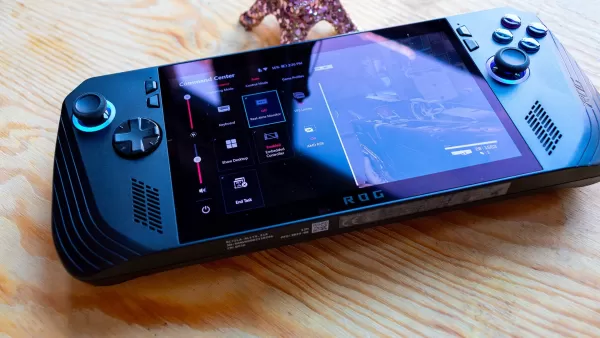
Elden Ring Nightreign Is Perfect on the Asus ROG Ally X
Nightreign looks stunning at 1080p with Maximum settings and plays very respectably. I completed entire sessions on this preset; while occasional stutters occurred, the experience was generally smooth, often hovering above 30 fps. Since 30 fps isn't for everyone, players seeking a better balance might prefer 720p at Maximum settings, which averages around 41 fps, offering a great middle ground between visual quality and smoothness.
For those determined to hit 60 fps on the Ally X, 720p is necessary, and you'll need to lower graphics to Medium or Low. Even then, a consistent 60 fps average isn't achievable—the system only hits that peak in less demanding, enclosed areas. The visual compromise is noticeable, however. On Low settings, Limveld loses its depth, with flat lighting, missing complex shadows, and low-poly structures.
Latest Articles
James Gunn Dismisses Fan Wars Ahead of Superman, Fantastic Four Releases
This summer, two major superhero films are primed for a box office showdown. The DC Universe's rebooted Superman arrives on July 11, followed by the Marvel Cinematic Universe's colossal The Fantastic Four: First Steps a mere two weeks later on July 2
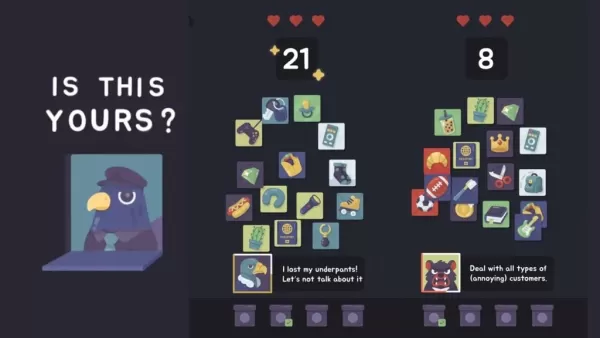
New Fast-Paced Puzzle Game 'Is This Yours?' Released by Cessabit Creators
Tepes Ovidiu, an indie developer from Romania, has launched a fresh puzzle game. His earlier titles include Cessabit, a memory game, and Not Chess. Is This Yours? is his latest creation, putting you in charge of a wildly disorganized lost & found cou
Tom Hardy Demands Oscar for Stunt Actors
Following the Academy's announcement that it will finally introduce an Oscar for Stunt Design, actor Tom Hardy has questioned whether a single award category is sufficient.In an interview with IGN ahead of the release of his new film, Havoc, Hardy sh

Explore a Mysterious World Powered by Your Movement in Monster Walk: Step Adventure, Out Now
Talofa Games, the creators of the acclaimed Run Legends, has officially released its latest mobile title. Although Monster Walk: Step Adventure entered early access in mid-July, it is now fully launching across Europe and the United States.The game
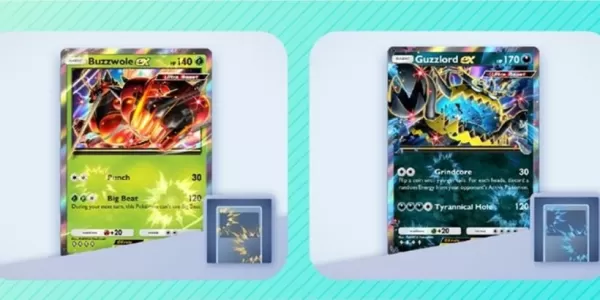
Pokémon TCG Pocket Launches Ultra Beast Event
The latest Mass Outbreak event is now live in Pokémon TCG PocketUltra Beasts are back in the spotlight once againFinish challenges or use Wonder Pick to acquire missing cards or discover new onesFor Pokémon Trading Card Game Pocket enthusiasts, the r

Sailor Cats 2 Joins Crunchyroll
Explore the cosmos to discover adorable feline companionsEnjoy charming mini-games for a dose of pure delightRemember to care for your kitties with pets and treatsIf one thing never fails to brighten my day on mobile, it's the heartwarming joy of who
Latest Games

Hitomi's Sick Pleasure
Casual丨597.60M

Vow Me, Faeries
Casual丨855.20M

Idle World - Build The Planet
Puzzle丨131.70M

Slot Book 777
Card丨28.10M




Trending Games
MORE +









Top News
MORE +


01
01-01
Call of Duty: Black Ops 6 Adds Fan-Favorite Modes
Call of Duty: Black Ops 6 receives classic game modes and map updates this week, addressing post-launch issues. The highly anticipated "Infected" mode arrives tomorrow, followed by the iconic "Nuketown" map on Friday, November 1st.
Infected and Nuketown Enhance Black Ops 6
Treyarch, the developer,
02
03-13
Top 10 LitRPG Books for 2025
Reading is my absolute favorite pastime. While I enjoy video games and TV, nothing quite compares to immersing myself in a captivating book series. My reading journey began with Harry Potter, branching out to sci-fi, fantasy, mysteries, and even some non-fiction. But my true literary passion ignite
03
04-08
Kingshot Beginner's Guide: Mastering Tower Defense Mechanics
Dive into the thrilling world of Kingshot, a multiplayer strategy game that masterfully combines precision shooting with tactical warfare. Set against the backdrop of a medieval fantasy realm, you step into the shoes of a powerful monarch, locked in a fierce struggle for supremacy over rival kingdom
04
03-05
Helldivers 2: Superstore Rotation (All Armor & Items)
Helldivers 2 Superstore: A Complete Guide to Armor and Item Rotations
Equipping the right armor is crucial in Helldivers 2. With diverse armor types (light, medium, heavy), unique passives, and varying stats, choosing your gear is a strategic decision. The Superstore offers exclusive armor sets an
05
04-26
Delta Force: Comprehensive Guide to All Combat Maps
Delta Force, the much-anticipated mobile shooter, is set to hit the mobile gaming scene this April. As the release date approaches, it's the perfect moment to familiarize new players with the diverse combat maps that await them. The game features four core maps: Zero Dam, Layali Grove, Brakkesh, and
Topics
More +